DataMonkey

I first learned about DataMonkey about a month ago on DataTau.
20140908_datamonkey_tweet

As a voracious consumer of MOOCs and a lover of all things data, I was curious about this new CodeAcademy-esque learning tool on databases (and, honestly, the monkey theme was too catchy to ignore). Offering two tracks in 1) Spreadsheets and 2) SQL, DataMonkey looked like a fun way to pick up the basics of creating spreadsheets, manipulating data, and querying databases. But, if you are already an Excel wizard or SQL programmer, learning how to input formulas in spreadsheets and write SELECT statements isn’t quite anything new. While not a expert in either, I’ve clocked enough hours munging data in Stata and R that these are far from foreign concepts. Trying out DataMonkey was thus less to learn spreadsheet formulas and SQL queries but to check out how – if at all  – this new learning tool may add that extra “je ne sais quoi” to the many, many already out there.

datamonkey_2 datamonkey_1

Spreadsheets

  • Learning the Spreadsheet Basic
  • Formulas and Conditions
  • Basic Text Formulas
  • Nest Formulas

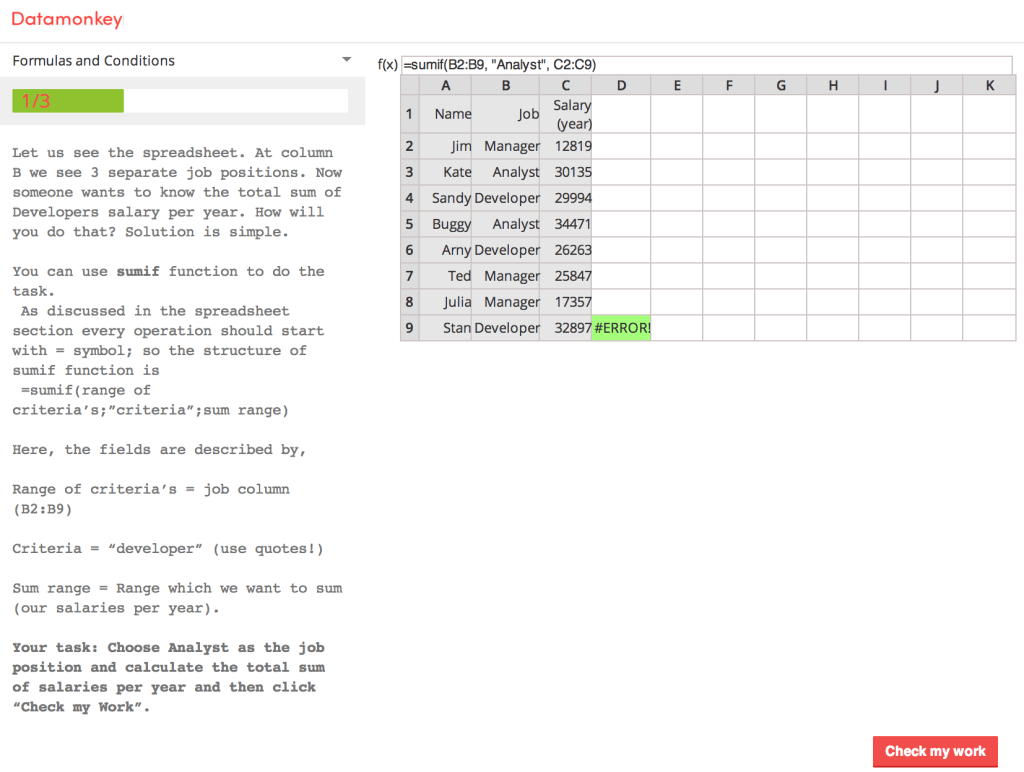
I did not complete all four lessons in the track, though not out of waning motivation. I was only minutes into the track, starting Lesson #2: Formulas and Conditions, and was excited to rack up my DataMonkey points when I hit up against a snag. An #ERROR! falsely flagging that an inputted formula was incorrect blocked me from moving forward. I double-checked that my eyes weren’t somehow playing games and replicated the formula successfully in Excel. What is going on? Seems like a bug.
20140908_spreadsheets

True enough, after contacting the co-founders, I got a response: “Your formula doesn’t work because of error in the program code. Now we fix it and you can continue education.
Thanks a lot for your help and callback.” I checked back on the lesson ~8 hours later and the bug wasn’t fixed yet. I decided to skip the rest of the Spreadsheet track and jump to the SQL track. I wasn’t picking up anything new and had the gist of DataMonkey’s approach. Nothing exciting.

SQL

  • Lesson 1
    • Guess SQL. Beginners level.
    • Guess SQL. Basic level.
    • Guess SQL. Test I.
    • Guess SQL. Level 3.
    • Guess SQL. Level 4.
  • Lesson 2
    • Preamble. Or what to do when you see SQL console.
    • Story I. Part I. About select, where and their logical friends who help our buddy Buggy.
    • Story I. Part II. About select, where and their logical friends who help our buddy Buggy.
    • Story II. Part I. About group by, having and how math functions can help in punishing bad guys.
    • Story II. Part II. About group by, having ad how math functions can help in punishing bad guys.
    • Case I. Online shop.

Lesson 1

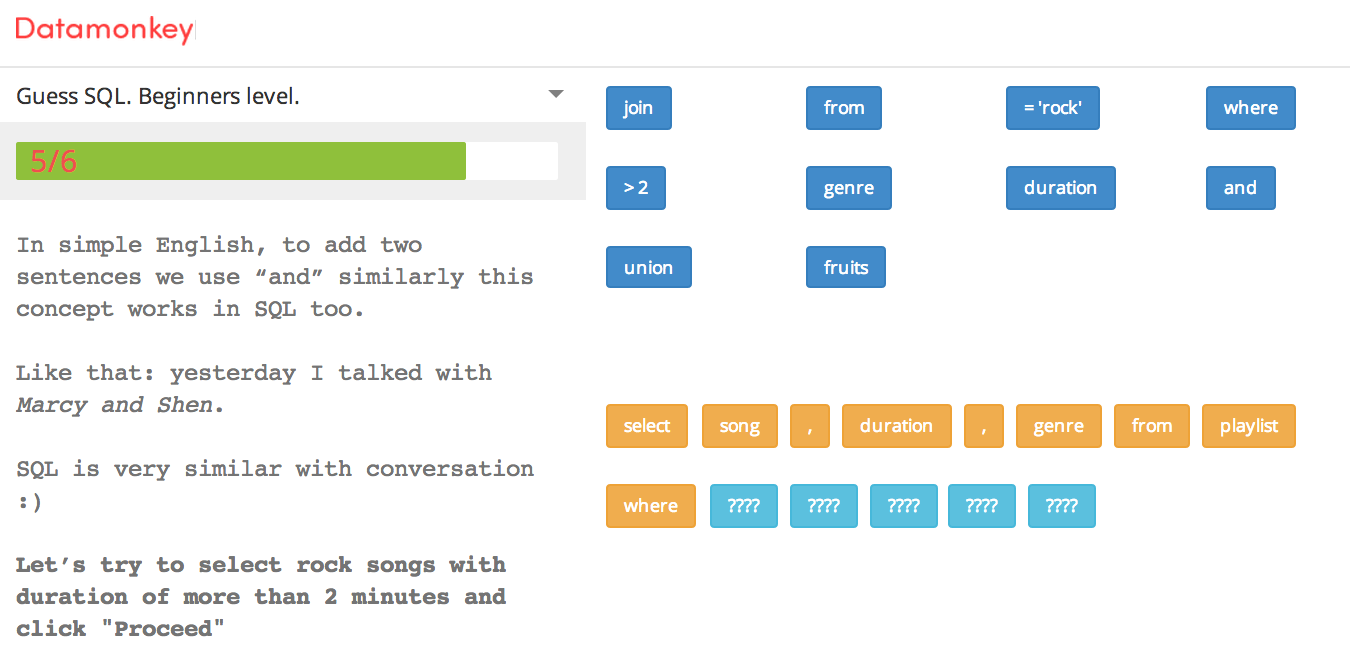
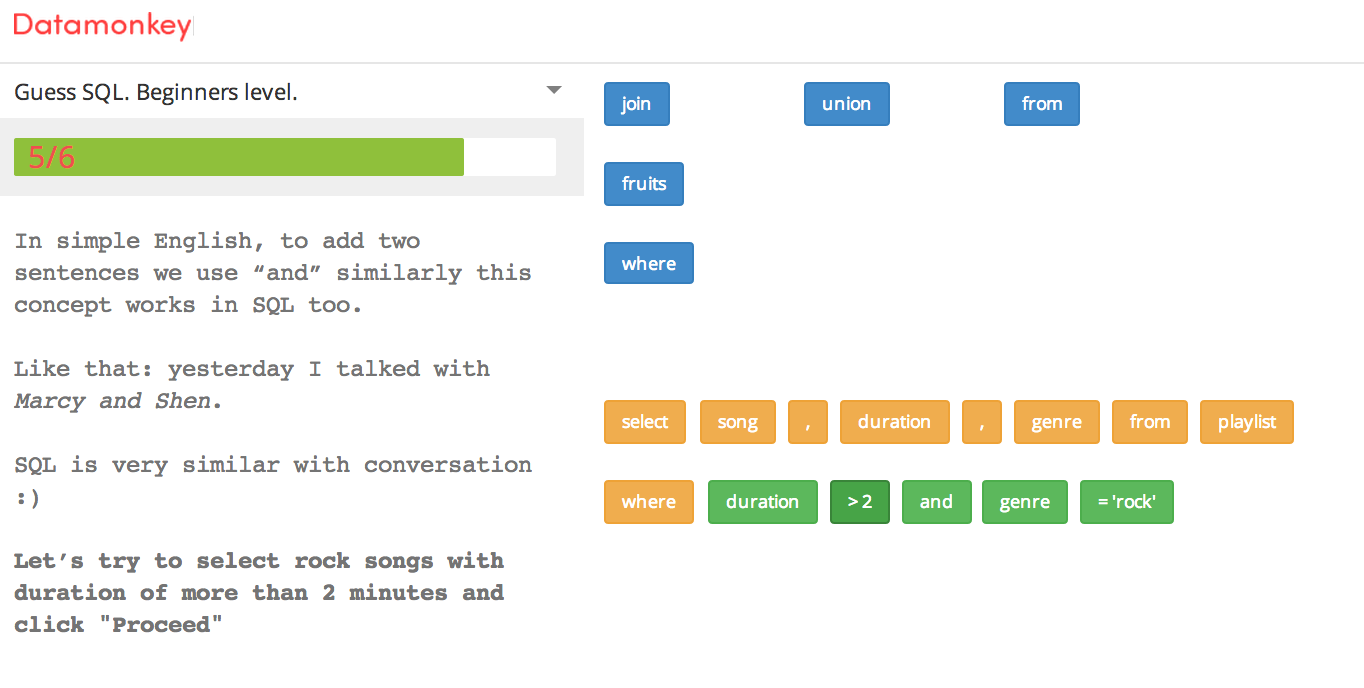
20140908_sql_fillin_1 20140908_sql_fillin_2

Lesson 1 is MadLib-style: you select words to fill in the blanks in a SQL statement. Of course, unlike MadLibs, each word must be in its correct spot to make sense. Unfortunately, you can blindly click, click, click in the word bank and the words will fill into their appropriate spots automatically.

I am not the fan of this approach. Sure, it may be a less intimidating than writing SQL statements from scratch but it doesn’t quite lay the groundwork of how to build out a complete SQL statement from an blank slate, starting with a question like “What are top 10 MOOCs by number of active users?”. I’ve seen this approach before in kids’ math workbooks e.g., fill in the blank with the correct operator: 5 __ 2 = 3. I’m not an expert in teaching methods so I am not aware of the potential merits to this fill-in-the-blank approach but I prefer the approach of learning while doing — and specifically, doing it how you will do it in “real-life”.

Well, sure enough, Lesson 2 addresses this concern.

Lesson 2

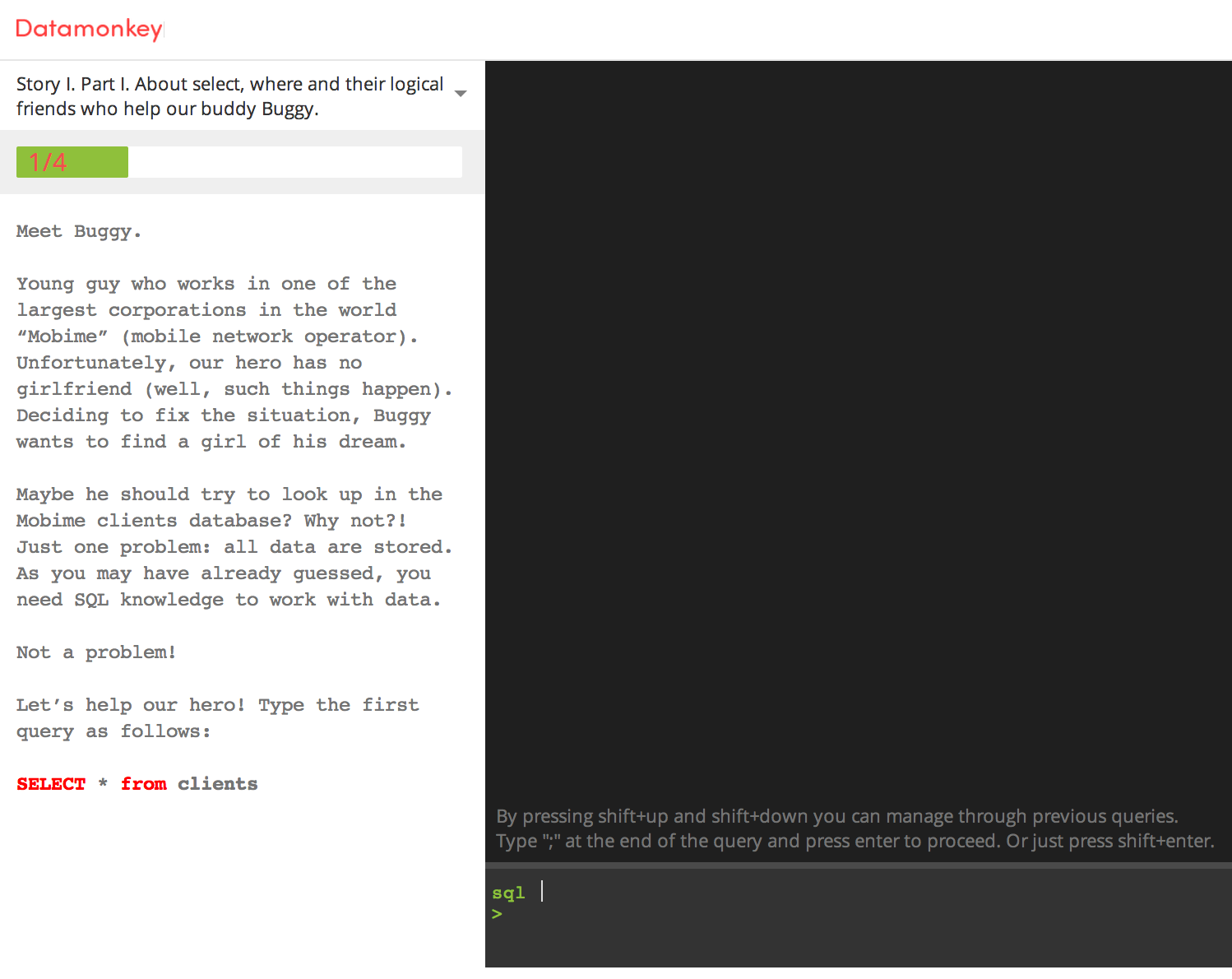
Lesson 2 uses the console where you are prompted to write SQL statements . The approach is CodeAcademy-esque though DataMonkey is more barebones in its features and functionalities e.g., hints, Q&A forum.
20140908_sql_console

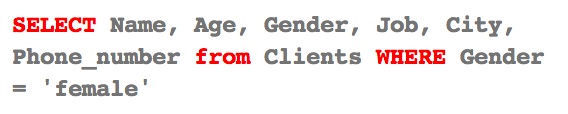
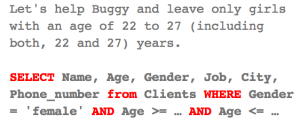
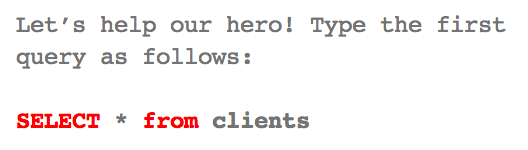
Also, DataMonkey more often than not simply gives you the SQL statement to type in. The exercise then simply becomes a mindless act of copying rather than an active process of figuring out how to query from plain English to SQL.
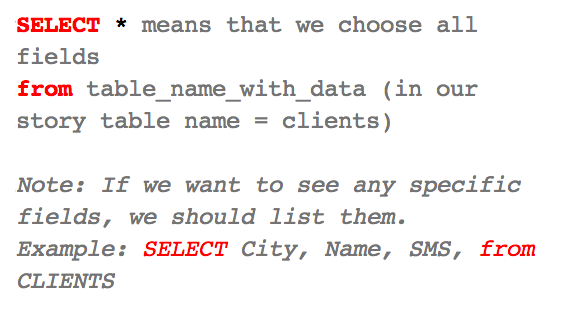
20140908_sql_1

20140908_sql_2

20140908_sql_3

Another thing you may notice from the example SQL statements above is the inconsistency of how the tables are called: clients, CLIENTS, Clients. For especially newbies, this would be incredibly confusing. Are table names not case-sensitive? How about variable names?

Similarly, looking at queries of specific values, the question may arise: are variable values not case-sensitive?
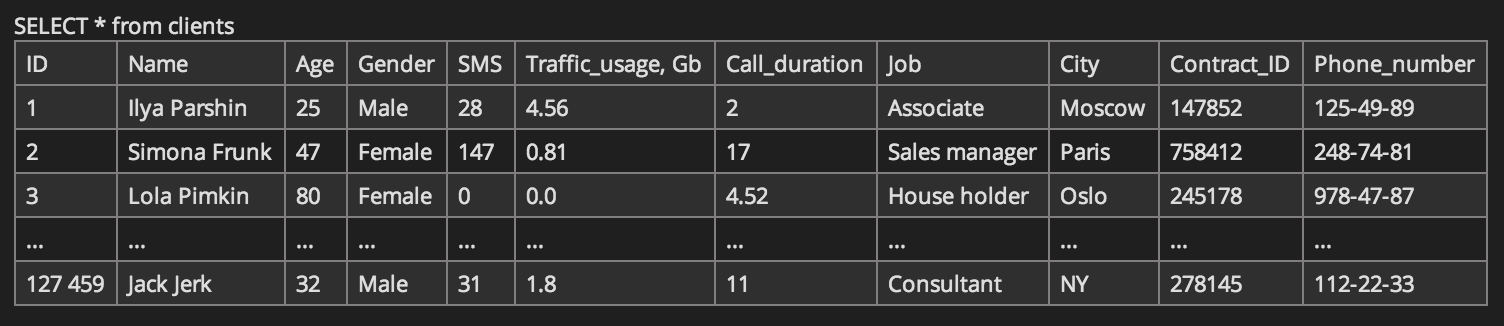
20140908_sql_4

20140908_sql_5

I had to Google to figure out exactly what was going on. I knew that SQL keywords such as SELECT, FROM, WHERE were case-insensitive but I wasn’t certain about table names, column names, and variable values. Coming from Stata, where these are all case-sensitive, I had assumed that Gender = ‘female’ is not equal to Gender = ‘Female’ is not equal to gender = ‘FEMALE’ and so on. Well, I learned something new:

Is SQL case sensitive?

SQL case sensitive string compare

Identifier case sensitivity

Case sensitivity in SQL statements

I still have some homework to do on how case sensitivity differs by DBMS e.g., Oracle, MySQL, PostgreSQL,  SQL Server, etc and operating system e.g., Windows vs. Unix/Linux. But all this considered, even if we don’t have to worry about case-sensitivity within DataMonkey’s environment, I would have appreciated consistency or, if not, an explanation of the why this works:
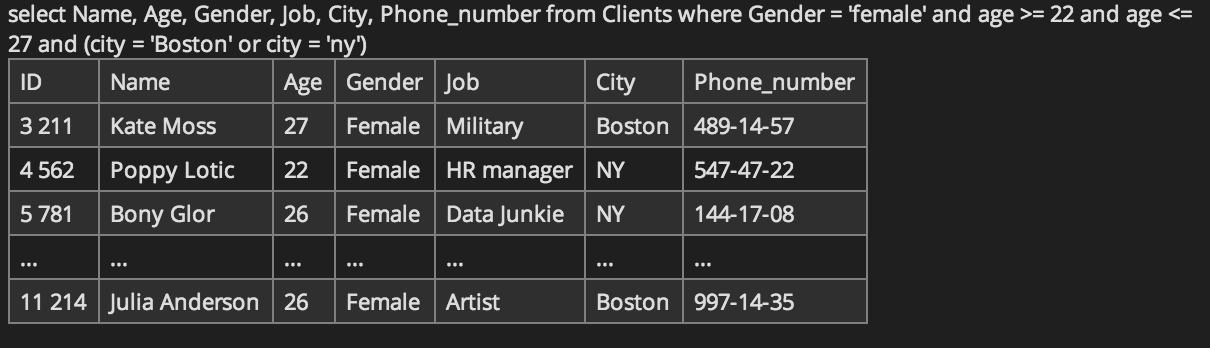
20140908_sql_6

Wish List

I’ll definitely keep an eye out as DataMonkey develops its content and polishes its learning tool. My wish list for DataMonkey includes:

  • ability to save my latest state i.e., where I was last in the sequence of lessons
  • ability to move between sections within a lesson
  • consistency in code examples
  • detailed error messages to help debug
  • more advanced levels (currently levels range from [beginners of beginners, medium complexity])
  • new lessons in R and Python


Review: The Art of Readable Code

Title: The Art of Readable Code: Simple and Practical Techniques for Writing Better Code

Authors: Dustin Boswell & Trevor Foucher

art_of_readable_code

Contents

  1. Code Should Be Easy to Understand
  2. Packing Information into Names
  3. Names that Can’t be Misconstrued
  4. Aesthetics
  5. Knowing What to Comment
  6. Making Comments Precise and Compact
  7. Making Control Flow Easy to Read
  8. Breaking Down Giant Expressions
  9. Variables and Readability
  10. Extracting Unrelated Subproblems
  11. One Task at a Time
  12. Turning Thoughts into Code
  13. Writing Less Code
  14. Testing and Readability
  15. Designing and Implementing a “Minute/Hour Counter”

art_of_readable_code_cartoon

Source: The Art of Readable Code

My Story

When I first arrived at Stanford a few years back, I was shocked by the disarray in which project files were being “organized”: no discernible structure, no standardization, no version control, etc. It was sheer confusion as I waddled through the files trying to figure out what was what. For example:

  • Is “analysis teacher turnover v3.do” or “analysis teacher turnover final.do” (same date-stamp) the latest version of the program file?
  • Does “analysis teacher turnover.do” have to be run before or after “analysis student turnover.do” … or does order not matter?

It was not only how files were named but the content of the files i.e., the code. It was as if I was reading someone’s diary and getting a gist of the underlying story swathed in inside jokes, unique lingo, and subtle inflections. The problem is code shared and collaborated across a team cannot be a personal journal of more or less rambling thoughts. If a graduate student or staff researcher on our team had left, his/her replacement would have little idea of how to replicate or update the code — or at least would have to spend an inordinate amount of time playing Sherlock Holmes. I wouldn’t even be surprised if the author wasn’t able to figure out the code without jolts of memory defibrillation.

Hence, as soon as I settled in, I wrote a manual of best practices for planning, organizing, and documenting code. Adopted by 30+ professors, graduate students, and staff, I called my manual the “POD”, drawing inspiration from J. Scott Long’s “The Workflow of Data Analysis Using Stata“. I wasn’t an expert on the topic but I had enough experience to share my know-how to lead an otherwise blind team towards adopting basic efficiencies (e.g., readability, consistency, etc) for reproducible research.

Some of the best practices in my “POD” manual echoed those in “The Art of Readable Code” including:

  • Packing information into your variable, function, and class names (8)
    • Choose specific words
    • Avoid generic names (or know when to use them)
    • Use concrete names instead of abstract names
    • Attach extra information to a name, by using a suffix or prefix
    • Decide how long a name should be
    • Use name formatting to pack extra information
  • Aesthetics (34)
    • Use consistent layout, with patterns the reader can get used to
    • Make similar code look similar
    • Group related lines of code into blocks

The Art of Readable Code

Boswell & Foucher lay out a lot of useful tips and step-by-step examples demonstrating the “art of readable code”. While the purpose of the book is not to teach the art of architecture or design patterns, the essential basics are covered: naming variables, including comments, formatting code (e.g., column alignment, blocks, logic order, etc), simplifying loops, etc. Sure, many of these things may seem intuitive or could have been figured out on-the-job but if not, this is a great place to start. And, for those who have already mastered these practices, reiteration of the “why?” and “how?” is always a helpful reminder of what can be dismissed as common-sense or second nature.

The key idea behind the teachings is:

“The Fundamental Theorem of Readability: Code should be written to minimize the time it would take for someone else to understand it.” (3)

What I love about this book is its plethora of examples illustrating the multiple ways in which you can implement the Fundamental Theorem of Readability. Examples are provided in C++, Java, JavaScript, and Python. But fear not if you are a newbie to programming or an expert in some other language, say, Stata! You do not need to be proficient in any of these languages to understand the concepts being illustrated: the beautiful code “art” vs. the uglier stuff. And, if you do get lost or intimidated, each chapter is wrapped up with a summary that bullets the key principles and techniques so you will always have the takeaways in plain English.

Review: Team Geek

Title: Team Geek – A Software Developer’s Guide to Working Well with Others

Author: Brian W. Fitzpatrick & Ben Collins-Sussman

teamgeek

Contents

  1. The Myth of the Genius Programmer
  2. Building an Awesome Team Culture
  3. Every Boat Needs a Captain
  4. The Art of Organizational Manipulation
  5. Users are People, Too

Mission Statement

“The goal of this book is to help programmers become more effective and efficient at creating software by improving their ability to understand, communicate with, and collaborate with other people.” (xiii)

Team Geek is a light and fun read with insightful commentary on how marrying the human “soft skills” with the technical “hard skills” can create the foundation for a great team. While Team Geek is written for software engineers (and their managers) in mind, its takeaways are relevant to anyone — engineer or non-engineer, lone wolf or team player. Though common sense at times with lessons already picked up from experience, what makes this book worth the read is the packaging of these lessons as entertaining stories and analogies like:

  • “Strengthen what we call the bus factor … the number of people that need to get hit by a bus before your project is completely doomed” (7)
  • “Your team’s culture is much like a good loaf of sourdough” (27)
  • “A boat without a captain is nothing more than a floating waiting room” (54)
  • “Engineers are … like plants: some need more light, and some need more water (and some need more bullshit, er, fertilizer).” (81)

Three Core Principles

The building blocks for a great team are based on “three pillars” of social dynamics: Humility, Respect, Trust — or HRT (12).

  • Humility: “You are not the center of the universe. You’re neither omniscient nor infallible. You’re open to self-improvement.”
  • Respect: “You genuinely care about others you work with. You treat them as human beings, and appreciate their abilities and accomplishments.”
  • Trust: “You believe others are competent and will do the right thing, and you’re OK with letting them drive when appropriate.”

What does this mean in practice? Actions of HRT include:

  • lose the ego
  • learn to both deal out and handle criticism
  • fail fast; learn; iterate
  • leave time for learning
  • learn patience
  • be open to influence

Using anecdotes and accompanying illustrations, the authors emphasize the importance of HRT not only for one’s own growth but for the success of the larger team. While the rare specimen of a “unicorn” or “lone craftsman” may exist, none of us work in a vacuum. Successful leaders are especially important in managing the team – particularly when attacked from within by poisonous threats (e.g., ego, over-entitlement, paranoia, perfectionism). Patterns (and anti-patterns) adopted by leaders to build a resilient (or dysfunctional) team are collected from first-hand accounts:

Antipattern (for Unsuccessful Leadership)

  • Hire pushovers
  • Ignore low performers
  • Ignore human issues
  • Be everyone’s friend
  • Compromising the hiring bar
  • Treat your team like children

Pattern (for Successful Leadership)

  • Lose the ego
  • Be a Zen master
  • Be a catalyst
  • Be a teacher and a mentor
  • Set clear goals
  • Be honest
  • Track happiness

All in all, HRT must be taken to heart by each and every team member in all interactions, big and small.

What I took to heart

As I find myself in a transitional phase seeking to learn what I am lacking (currently be on a team of a lonely one without strong leaders and mentors to learn from) and what I am searching for to find that happy spot in a Team Geek, the following resonated with me:

  • “If you spend all your time working alone, you’re increasing the risk of failure and cheating your potential for growth.” (5)
  • “Working alone is inherently riskier than working with others. While you may be afraid of someone stealing your idea or thinking you’re dumb, you should be much more scared of wasting huge swaths of time toiling away on the wrong thing.” (10)
  • “Your self-worth shouldn’t be connected to the code you write. To repeat ourselves: you are not your code.” (17)
  • “Let’s face it: it’s fun to be the most knowledgeable person in the room, and mentoring others can be incredibly rewarding. The problem is that once you reach a local maximum on your team, you stop learning. And when you stop learning, you get bored. Or accidentally become obsolete. It’s really easy to get addicted to being a leading player; but only by giving up some ego will you ever change directions and get exposed to new things. Again, it’s about increasing humility and being willing to learn as much as teach. Put yourself outside your comfort zone now and then; find a fishbowl with bigger fish than you and rise to whatever challenges they hand out to you. You’ll be much happier in the long run.” (20)

Even if we think we can stand on our own and detach from the human dramas, software engineering (and essentially all personal relationships and professional endeavors) is a team sport and in order for us all to win, especially in the trenches of conflict and bureaucracies, everyone must play the game by the social rules: Humility, Respect, and Trust.

* * * * *

Check out Fitzpatrick & Collins-Sussman’s Google I/O 2009 talk “The Myth of the Genius Programmer”: http://youtu.be/0SARbwvhupQ

What are the Trends for the Top 10 GitHub Languages?


github_search_top10totals_coloredbylanguage github_search_top10totals_coloredbylanguage_forkfalse


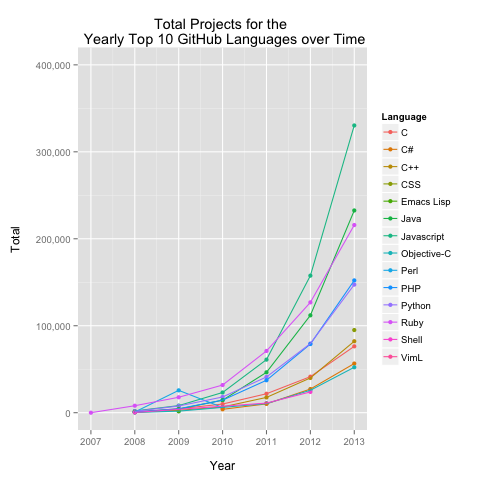
The graphs above display the annual top 10 GitHub languages over time in terms of repos and projects (data source: https://github.com/search/advanced). One important note is that the full history of a language’s presence in GitHub from inception to demise is not shown.

For example, a drop-out in the graph does not necessarily mean that no one is pushing repos or projects in that language anymore but may simply illustrate that the language is no longer ranked in the top 10 for that given year. Of course, the distinction cannot be explicitly tweezed out. Maybe the language has completely vanished! However, we can assume quite confidently that a top 10 language didn’t just suddenly die off. Conversely, a language that pops up is not necessarily a hot “new” language but simply may not have been previously ranked in the top 10.

Example: Shell is not observed in 2013 as it was replaced in the ranks by CSS, which in turn is in existence prior to 2013 but not in the top 10 (and hence not plotted in the graph).

The fun of taking simple numbers such as this and visually plotting the trends is to see if we can tell a story. So, what can we make from these graphs? How do the patterns jive with the known trends in programming languages?

A few starters:


Playing with GitHub Data: The Start (Part 2)

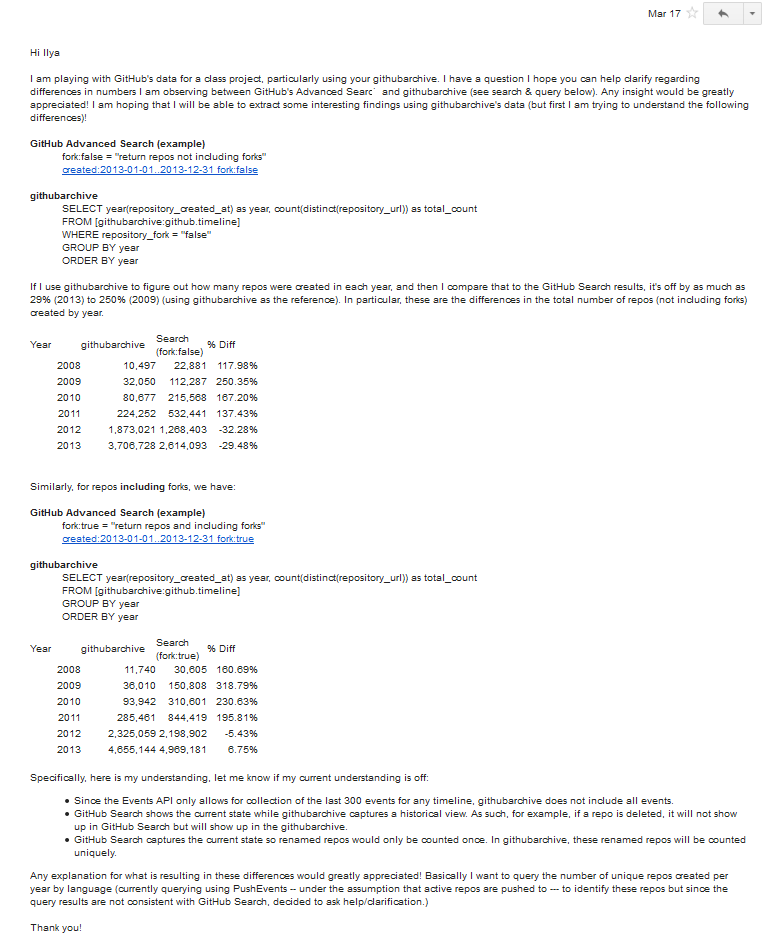
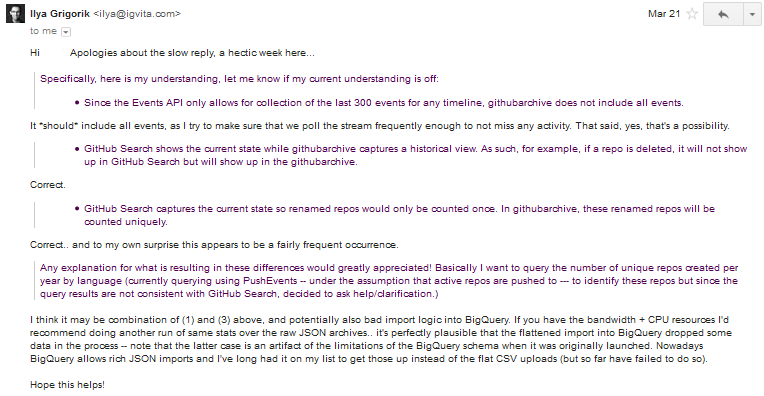
In continuation to the questions raised in “Playing with GitHub Data: The Start (Part 1)”, I decided to ask the Man. The man being Ilya Grigorik: the man behind GitHub Archive.

Surely, he will be able to provide insight on the differences observed between the GitHub search and GitHub Archive query search counts.

github_total_comparison_projectsgithub_total_comparison_repos


I reached out to Ilya.

20140317_github_ilyagrigorik_email1_v2


He responds.


20140317_github_ilyagrigorik_email2_v2


So let it be known. Keep it in mind when playing with GitHub Archive via BigQuery.


Playing with GitHub Data: The Start (Part 1)

Since March/April, I have been sitting on my hands not quite ready to hit the “Publish” button to push my words off onto the instantaneous online press. But as time passes by, I am losing the details of the what, why, how of my GitHub data explorations and going back through my GitHub history to identify my work processes requires more and more mental aerobics. Hence, while I am still in a state of partial clarity, I will do my best to squeeze out my months-past thoughts during an afternoon writing spurt.

* * * Here I go! * * *

Wanting to have fun exploring GitHub data, I headed first to the playground: GitHub’s API. It had all that I could want for my preliminary explorations. I could grab data on repository languages, pushes, forks, stars, etc. You name it. Problem was it was like standing at the base of a bouldering wall, positioning yourself in your first hanging form, and then not knowing how to reach the next boulder on the colored route. My technique was not quite even a V0 and my arms were too weak to compensate by just pulling myself up through sheer muscle.

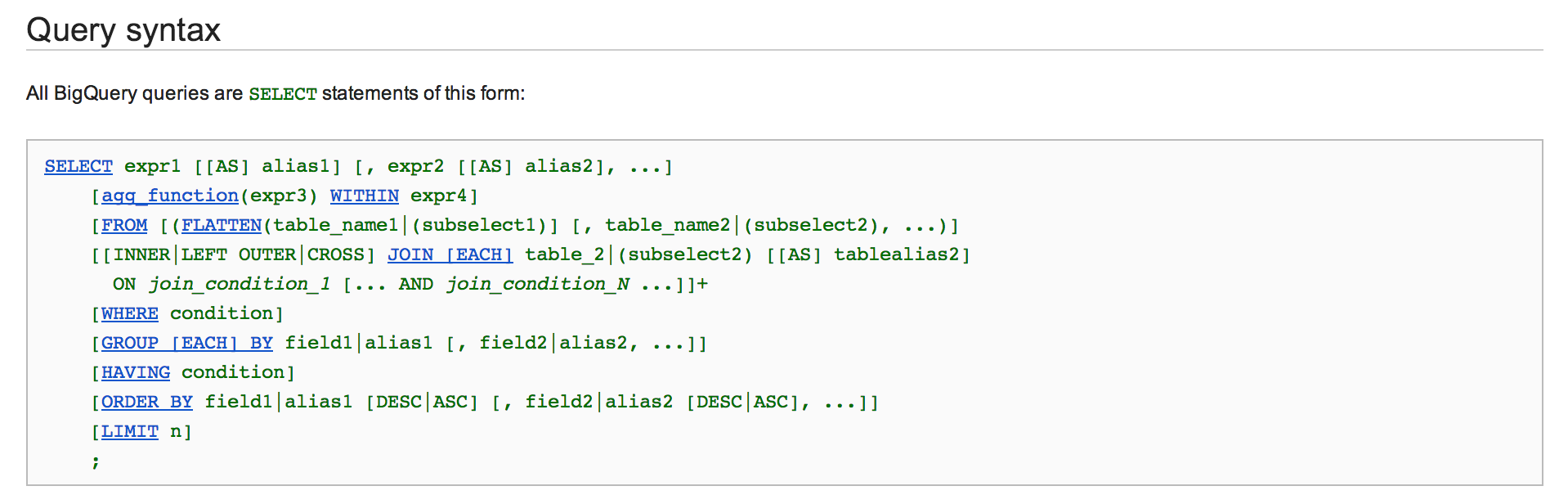
That’s when I found GitHub Archive. GitHub Archive is a “project to record the public GitHub timeline, archive it, and make it easily accessible for further analysis.” With the data hosted on Google BigQuery, the GitHub event data was readily available to be queried using SQL.

SQL! SELECT statements! I can do that!

bigquery


I decided to go ahead and first explore GitHub’s data via GitHub Archive. The API would have to wait.

I started out with a basic question: What is the growth trend of total GitHub repositories? What is the growth trend of total GitHub projects i.e., repositories excluding forks?

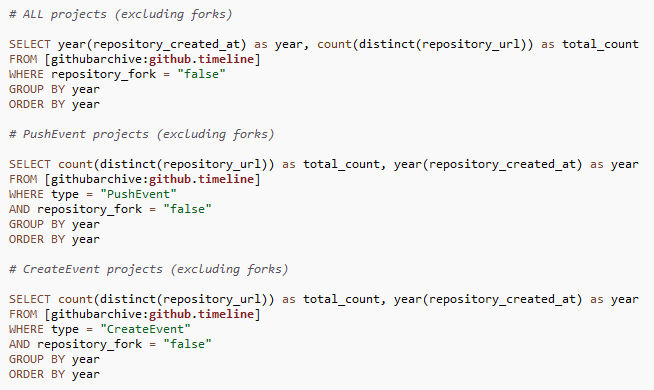
To answer these questions, I parsed the GitHub Archive data in three ways:

  • GitHub Archive
  • GitHub Archive: CreateEvent
  • GitHub Archive: PushEvent

Side Track: CreateEvent vs. PushEvent

The reason why I looked at both CreateEvent and PushEvent was to investigate the peculiarities that emerged when running my initial query for the number of repositories by programming language and creation date, restricted only to CreateEvent. Looking for whether anyone else had run a similar analysis on which I could compare my results, I stumbled upon Adam Bard’s blog post “Top GitHub Languages for 2013 (so far)”.

Here was his query.

adambard_top25githublangs


This query was similar to mine but after exploring the data more closely, I had a couple issues with this approach. Although it may be difficult to see without looking at the raw data structure, the questions that popped up were:

  • Wouldn’t counting non-distinct languages i.e., count(repository_language) result in duplicate counts of unique repositories?
  • Shouldn’t we be looking at only CreateEvent’s payload_ref_type == “repository” rather than also including branches and tags?
  • Don’t we have a “null” issue for repository language identifications of CreateEvents?
    • over 99% of CreateEvents with payload_ref_type == “repository” have “null” repository language
    • over 60% of CreateEvents for all payload_ref_type {repository (>99%), branch (~28%), tag (~57%)} have “null” repository language

Example

Let’s look at the Ceasar’s repository “twosheds”.

createevent_ceasar_twosheds


If we count using count(repository_language), we would have the following total counts by language:

  • Python: 14
  • null: 1

Now this seems wrong. Why would we count these records multiple times as unique repositories? Instead, these should fall under one repository count for “twosheds” and be categorized as written in Python. What if we restrict the query to only CreateEvent’s payload_ref_type == “repository” and count as count(distinct(repository_url))? The issue here is that the assigned language is now “null”.

Sure, we could think of ways around this — for example, take the maximum non-missing language identification for each unique CreateEvent’s repository URL, regardless of the payload reference type. However, given the prevalence of “null” language identifications for CreateEvent, why not try PushEvent instead? We can check if PushEvent has similar missingness with its repository language identifications. If not, under the assumption that active repositories are pushed to, we can count the distinct repository URLs of PushEvents to identify unique repositories by creation date and programming language.

Indeed, only ~12% of PushEvents have “null” repository language identifications. PushEvent seems to be good alternative!

Back on Track & Back to Basics

Let’s go back to our initial question: What is the growth trend of total GitHub repositories? What is the growth trend of total GitHub projects i.e., repositories excluding forks? I computed the yearly totals using count(distinct(repository_url)) to count the total number of unique repositories by creation date (year).

total_sql_query_v2


As a litmus of sorts, I compared these yearly counts to those from GitHub Search.

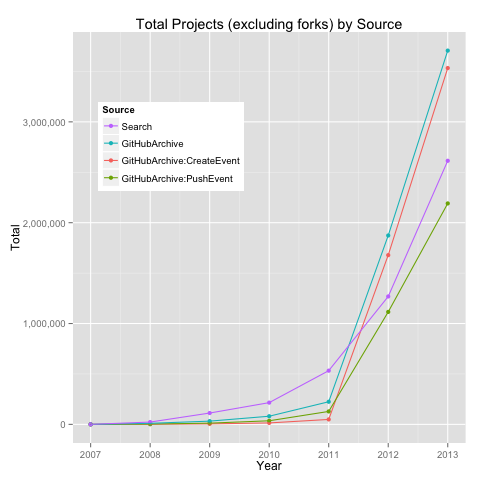
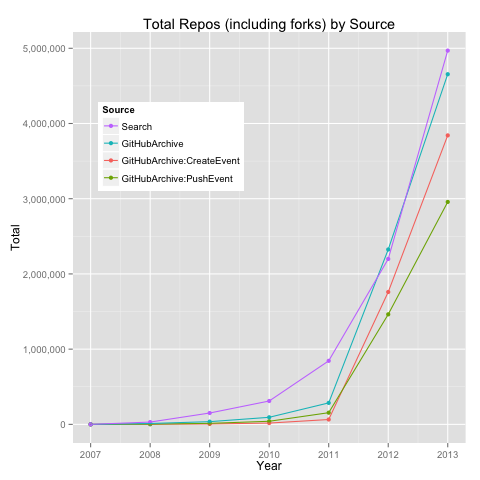
github_total_comparison_reposgithub_total_comparison_projects


What do we notice here?

Assuming GitHub Search as the barometer of expectation:

  • prior to 2012, GitHub Archive (all, CreateEvent, PushEvent) seems to produce underestimates of total repositories and projects
  • repositories: Search ~ GitHub Archive (all)
  • projects: Search ~ PushEvent

Now, why do we observe these differences?

I mulled over the observed differences, raising my stack of questions higher. What is going on here? How will it affect my analyses?

paperstack


For now, I will leave it here and continue next time with more on the GitHub analysis I ended up pursuing.

As I say adieu, I ask: What interesting or curious things do you notice here so far?


Figuring out GitHub Search

I have been wanting to play around with GitHub data as a side project so when I first started poking around for what GitHub meta & event data I could grab, not yet being an API ninja, I went to the simplest point-click-Enter-Return shop in town: GitHub Search.

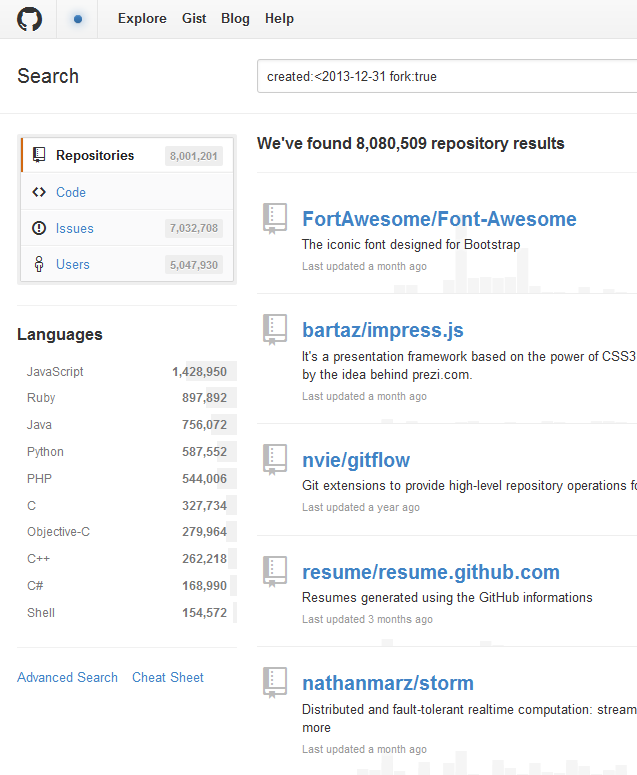
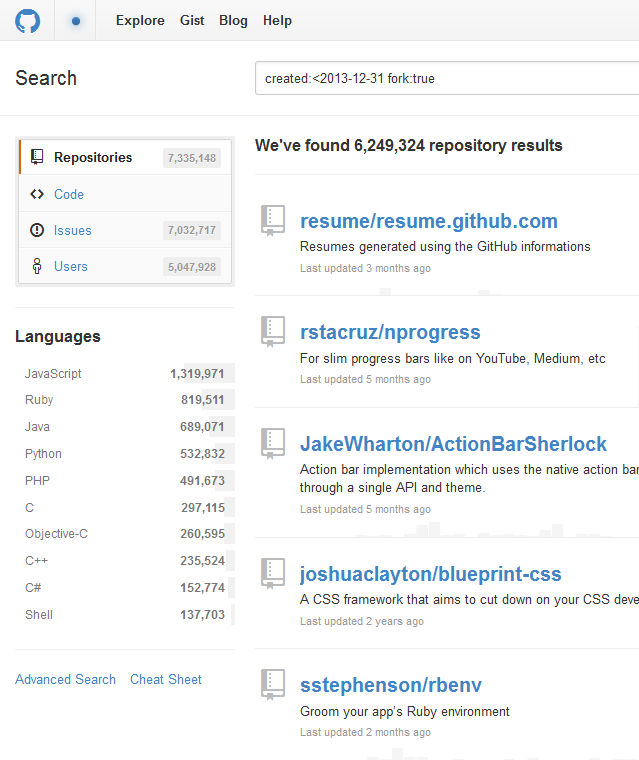
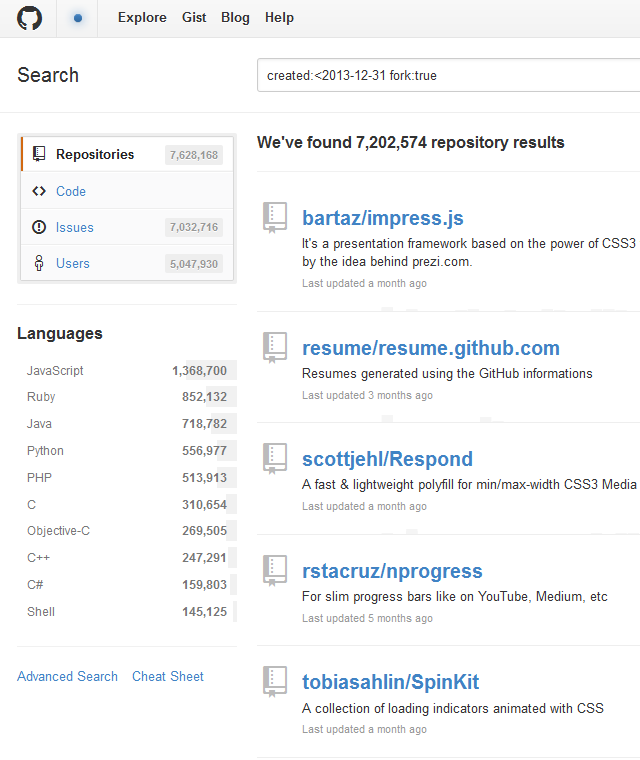
But when I was there, I noticed something strange. Each time I would refresh a search using the same parameters (e.g., “created:<2013-12-31 fork:true”), the results would produce different numbers. Moreover, conflicting counts of total repositories were displayed in the same search results: under “Repositories” and in “We’ve found [] repository results”.

search4search7search14search10

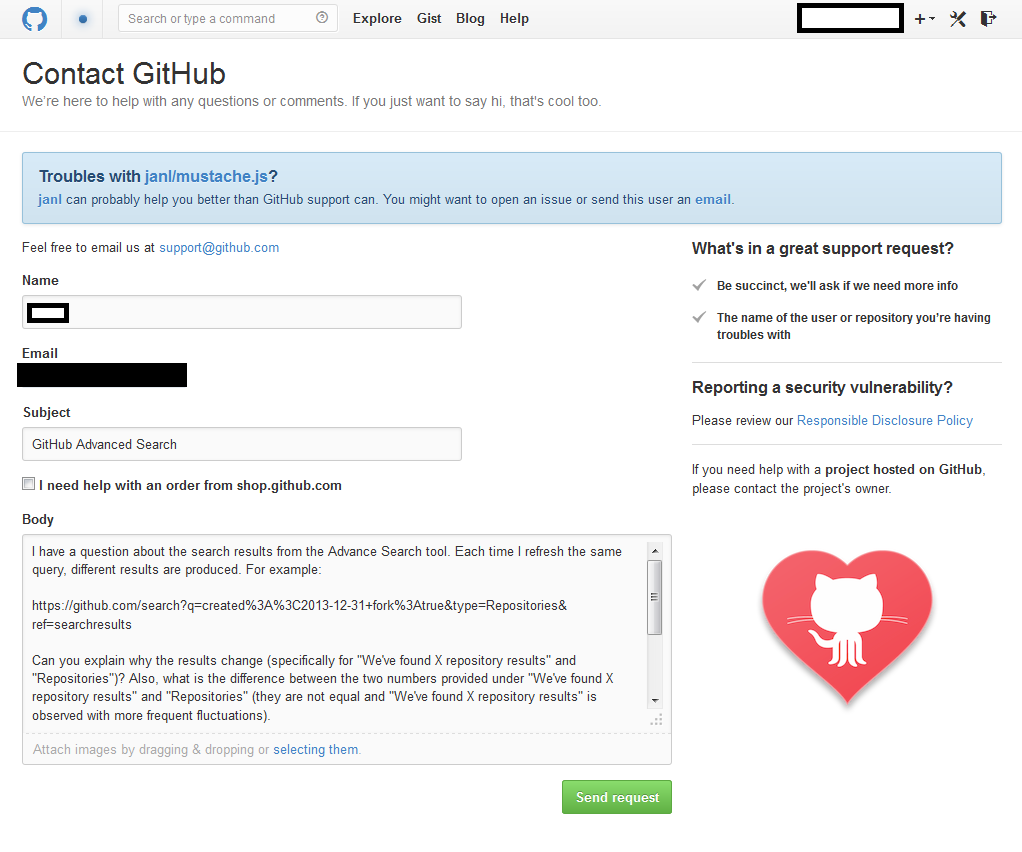
What was happening? I asked my to-go guy regarding all-things-tech (the technical stuff beyond the default “just try restarting your computer”). He gave me a “Hmmmm that’s strange. Something to do with caching?”. Not quite convinced, I decided to seek a more authoritative explanation from GitHub.

question_v2

I wasn’t waiting with bated breath (already having generated low expectations from a lifetime of mediocre customer service, unfair as it is to batch many tech startups/companies with bureaucratic behemoths like “Comcrap”, as my roommate amusingly nicknames).

Less than two days later I received a response from GitHub Support.

Thanks for getting in touch and asking about this!

 Some queries are computationally expensive for our Search to execute. For performance reasons, there are limits to how long queries can be executed. In rare situations when a timeout is reached, Search collects and returns matches that were already found, and the execution of the query is stopped.

That particular query you’re running is hitting this timeout, and as a result — you’re getting small variations in the number or results that were collected before the timeout was hit.

 The Search team is discussing this internally and looking into ways to make such situations less confusing, so your feedback is more than welcome!

 The reason why the two numbers provided under “We’ve found X repository results” and “Repositories” are different is caching. The number under “Repositories” is cached so it doesn’t change with page refreshes, as does the “We’ve found X repository results” number. That’s definitely confusing, and I’ll open an internal issue to get that fixed. 

Hope this explains things! If you have any other questions — please let us know.

Cheers

What a phenomenal answer!

GitHub Support not only responded in days time but addressed each question in a way that did not pass it off with a canned auto-reply or diminish it as “some silly question” wasting their customer support engineer’s precious time. The response even came with a swaddling of exclamations (“!”), welcoming the input as helpful feedback to be acted on for improved user experience.

I continued my conversation with the GitHub Support person with questions regarding a second-party data source. Likewise a timely, thorough, and – best of all – human response followed.

Thank you, GitHub!